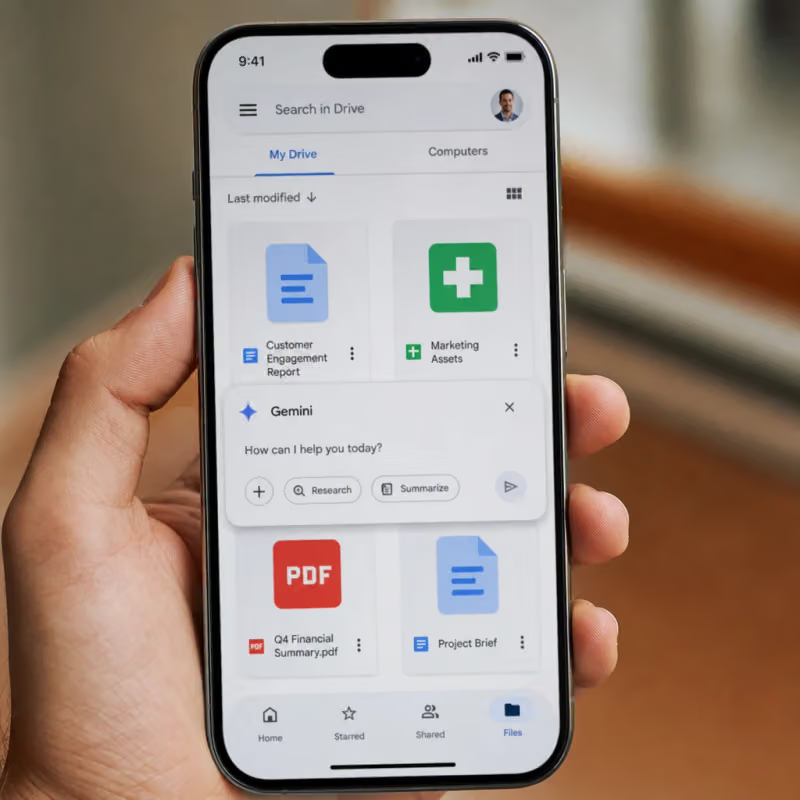
Google has expanded the Drive app for Android and iPhone with a new AI feature. From now on, questions can be asked about multiple files at once, instead of opening each document individually.
The AI Gemini searches contracts, spreadsheets, or presentations and summarizes the answer in a few sentences. The feature has been gradually rolling out since the end of June but requires a paid Google subscription.
Gemini answers questions directly in Drive search
Until now, Google Drive only helped with the classic search for file names or individual keywords. Now, two new components are being added, as Google reports in the official Workspace blog. "AI summaries" automatically summarize the results of a search in a few sentences.
No one has to click through each individual file anymore.
Those who want to ask deeper questions can instead open “Ask Gemini”. This is a kind of conversation with one's own files.
Gemini answers follow-up questions about contracts, spreadsheets, or presentations without altering or copying the original files. Both functions access content from Drive, other Workspace apps, and the web, while existing access rights remain untouched.
A similar Gemini sidebar in Drive has already existed on computers for some time. What is new is that both functions now also work on smartphones.
Those who need to look something up quickly on the go are no longer dependent on the office computer and can ask the same question from the train or between two appointments.
In office life, this saves long searches in file folders
An example from the everyday work of an office clerk: An employee in purchasing needs to find out which supplier contracts have a short notice period. Twelve PDF files are located in the shared folder for this purpose.
Instead of opening each file individually, she types the question directly into the Drive search on her smartphone and receives a summary with a reference to the respective source file.
Similarly, outstanding invoices in a folder can be tracked down. The most important resolutions from a long meeting protocol can also be extracted this way without reading the entire text.
The function only searches files that the respective person already has access to. Each answer also indicates which file the information comes from, allowing details to be quickly verified if necessary.
Here’s how to start the function in practice:
- Open the Drive app on the smartphone.
- Tap on "Ask Gemini" in the search bar.
- Enter the question in normal sentences, such as about a specific clause in multiple contracts.
- Check the answer and the linked source files.
- Follow up with a clarifying question if needed.
The function costs money and is not equally visible everywhere
The new search and answer function is not free. According to the Google Drive Help, either a private subscription to Google AI Pro or Ultra is required, or a business account with Google Workspace starting from the Business Standard level is sufficient. Google AI Pro costs 21.99 euros per month and additionally provides 5 terabytes of storage.
Workspace Business Standard starts at 11.50 euros per user per month with annual payment, while it is 13.80 euros monthly. The free Google basic access with limited Gemini access is not sufficient for the new function.
German is among the supported languages, with a total of more than 28.
However, even those who have a suitable subscription may not see the function immediately. The rollout began at the end of June and is taking several weeks depending on the account and region.
In business accounts, IT administrators must also keep the "smart features" for Workspace enabled; otherwise, the function remains invisible to the workforce, even if the appropriate subscription has already been booked.
It will be crucial whether employers provide their employees with the necessary subscription at all. Without Business or AI Pro access, Gemini remains invisible in Drive search.
The portal schieb.de advises that AI summaries for contracts, invoices, or other legally relevant documents should always be cross-checked with the original.
The AI summarizes formulations freely and can also make mistakes. Anyone searching customer or company data through the function should first take a look at internal guidelines for handling sensitive information.